
How to build an AI copilot without paying for an API: this site's architecture
This site's copilot does not call a paid AI API—it runs isolated and authenticated by login. The two-process architecture and the bug that almost invented an answer.
Download this tutorial's materials:
- Kit de código de referência (ZIP)13 KBbridge-server.js, site-client.ts, unidade systemd de exemplo, README e o manual em PDF.
- Manual em PDF (7 páginas)13 KBAs duas camadas, o usuário dedicado, o bug do sandbox, quando essa arquitetura não é a certa, e checklist de implantação.
Want to receive new manuals and industrial schematics? Join our channel on Telegram / WhatsApp
The question that motivated this article
If you have already spoken with the assistant in the corner of this page, you have seen an AI copilot answer questions about ESP32 boards, protocols and code in seconds. When someone asks to see “how it was built”, the question almost always carries an assumption: “you must be spending a fortune on API calls, right?”
The answer is no. This copilot does not make a single call to a paid AI API. It runs a command-line assistant — the same kind of tool developers use to program — authenticated by login, inside a process isolated from the rest of the site. This article explains the architecture behind it, including the bug that nearly made the copilot invent incorrect answers with complete confidence.
Why not call an AI API directly
The obvious path for an AI chat on a website is: the visitor sends a question, the server forwards it to a cloud AI API, and the answer comes back. It is simple, it is what most tutorials show, and it works well at low volume.
The problem appears on the bill. Every question is a token-billed call, and a technical-content site attracts people testing the limits — repeated questions, off-topic questions, and curiosity about how far the bot will go. Multiply that over a month and the cost stops being negligible for a project that sells nothing behind the copilot.
This site instead runs an AI assistant already authenticated with a personal login — with no per-call charge — and solves the problem this creates through architecture: this kind of tool was designed to run in your terminal with broad access to your machine, not to receive questions from strangers on the internet.
The security problem that defined everything
This site's main process runs with system restrictions designed to contain a public website: no permission to escalate privileges and no access to parts of the system outside its own area. That is the right behavior for anything exposed to the internet.
The friction is that a command-line assistant authenticated by login, when it must run isolated from the rest of the server, needs to switch operating-system users before executing — and that user switch is exactly the kind of operation the main process restrictions intentionally block.
The answer was not to loosen the site's restrictions — that kind of decision looks practical and becomes the first thing an attack exploits. The answer was to remove that responsibility from the main process.
The two layers
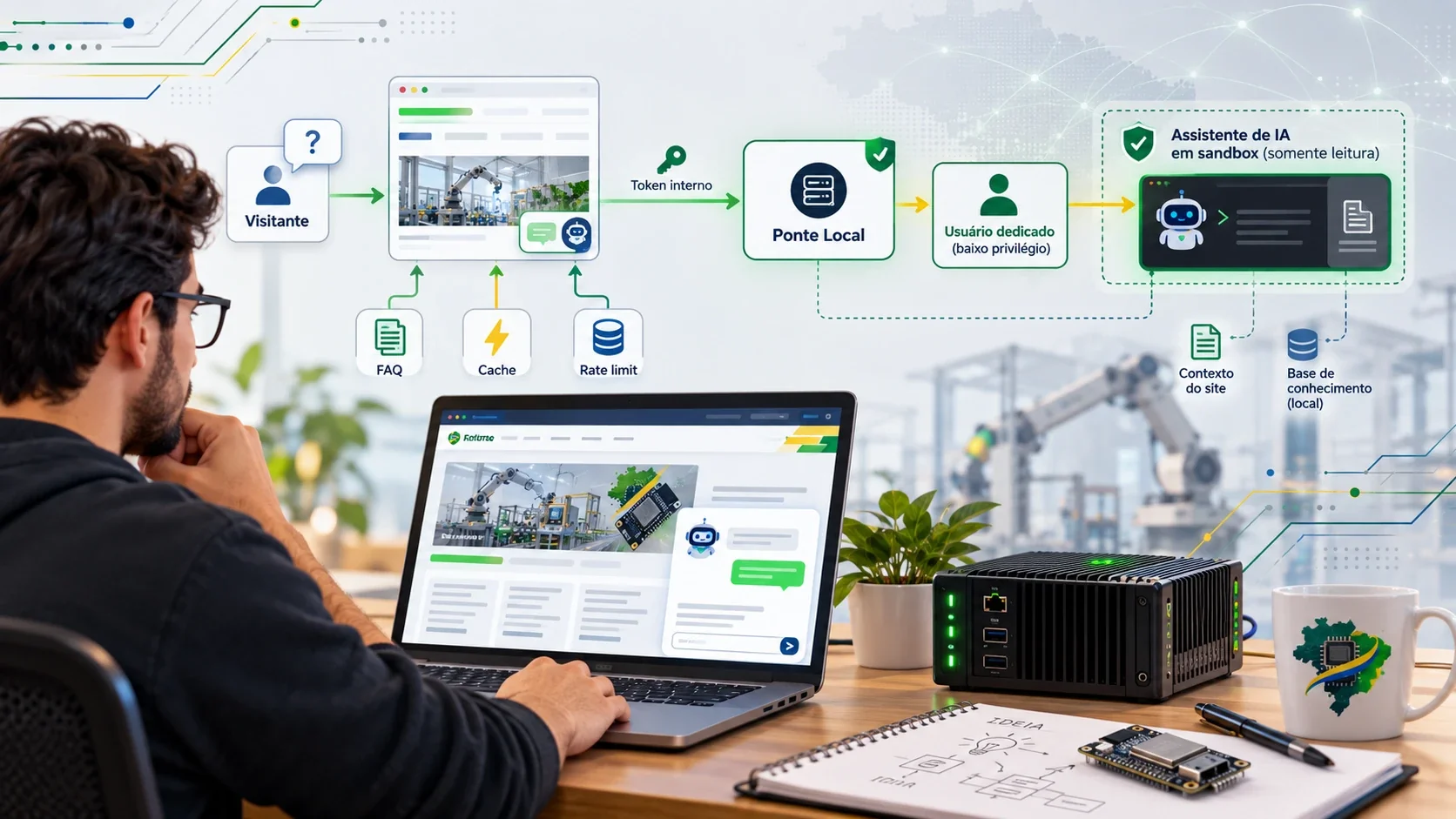
The copilot lives in two separate processes that communicate only through an internal call:
1. The site. Receives the visitor's question, applies rate limits and cache, and forwards it to the second process. 2. The bridge. A separate service without the site's restrictions. It runs the AI assistant as a system user dedicated only to this task — with no access to server secrets and no write access beyond what it needs for itself.
| 1 | Visitor → Site (Next.js) → internal call → Bridge (separate process) |
| 2 | ↓ |
| 3 | dedicated, unprivileged user |
| 4 | ↓ |
| 5 | AI assistant (read-only sandbox) |
The call between the two layers is internal, accepted only from the same machine, and requires its own authentication token — anyone without the token cannot talk to the bridge, even from the same network.
The user who has access to nothing
The component that makes this separation worthwhile is the dedicated user: a system account created only to run the AI assistant, with no interactive shell, no login permission, and only the tool's authenticated session stored there. It cannot see the site's secrets or write to any folder beyond its own. If the AI assistant is instructed to do something improper, the worst it can reach is its own isolated space.
This is the same principle as any sandbox: the goal is not to prevent everything from going wrong inside it, but to ensure that something going wrong inside it does not mean something went wrong everywhere else.
The bug that made the AI invent an answer instead of reporting an error
This is the kind of defect that appears only after everything seems to be working. The assistant was instructed to consult the site's internal catalog files before answering questions about boards and tutorials — instead of answering “from memory”, it was supposed to read the real data first.
The assistant's execution sandbox uses process isolation underneath, and that isolation needs a specific kind of network socket only to build its own internal loopback interface — nothing that reaches the real internet. The bridge's network restrictions did not include that socket type, so every command the assistant tried to run failed silently.
The side effect was as dangerous as possible: instead of saying “I could not read the file”, the model sometimes filled the gap with a plausible but wrong answer — the wrong category for a board, for example. Fluent and convincing, but false.
The fix was to explicitly allow that socket type in the bridge's restriction list without opening real network access. But the reason for telling this story is not the technical detail; it is the warning: a sandbox that is too restrictive can silence its own error, and the only defense is to instruct the assistant to admit when it could not confirm something rather than assuming it will always report that on its own.
Cache and question limits
Without usage control, any AI copilot becomes an expensive way — in time, if not money — to answer the same question repeatedly. Two layers solve that:
- Limit per visitor: a maximum number of questions per time window and source address, enough for a real conversation but too short to automate abuse.
- Response cache: repeated questions — and on a public site many questions repeat almost word for word — do not call the assistant again. The question is normalized (lowercase, accents removed, punctuation removed) and used as the key. In the measurements from this site, the first answer takes most of twenty seconds; the same question on the second request returns in a fraction of a second.
An even cheaper layer: answer without calling the model at all
Before invoking the AI assistant, the site tries to match the question against its own FAQ database, built from the same content already present in its tutorials and concepts. When it matches, the answer arrives in roughly one hundred milliseconds, without a queue, usage limit or execution cost.
This does not replace the assistant; it replaces the fraction of questions that already have an answer somewhere on the site. It is the same logic as any support system: answer quickly what is already known and reserve expensive processing for what really needs it.
Conversation memory
A common trap in this architecture is that each assistant call is isolated by default, with no memory of what was asked before. A “yes” or “you can write it” confirming something from the previous question reaches the assistant without context, and the conversation starts over in its head — even though the visitor sees the full history on the screen.
The correction is simple to describe and easy to forget: send the last exchanges of the conversation with each new question as part of the assistant input. When history exists, skip the cache as well — a response that depends on what came before cannot be served to another person who asked the same isolated question.
When this architecture is not the right choice
The counterpoint is important because no architectural choice fits everything:
Personal login is not for a high-traffic commercial product. Login authentication was designed for individual use, not to serve thousands of simultaneous visitors behind one login. Past a certain volume, the correct path is a paid API again, with a contract and limits appropriate for commercial use.
Process isolation creates operational work. Two systemd services, a dedicated system user and a token synchronized between them are more pieces to keep running than a direct HTTP call to an API. For a personal project or a content site, the avoided cost may be worth it. For a small team without operational time, it may not be.
A sandbox reduces risk; it does not eliminate it. The socket bug is proof: even a well-designed isolation can fail in a way that was not in the plan. The defense is not blind trust in the sandbox; it is combining isolation with clear instructions for the model to admit uncertainty and testing that behavior before relying on it.
Continue the conversation
If you want to query an AI model through an API from an ESP32 rather than host a copilot on a website, the path and the costs are explained in Using public AI APIs from ESP32. If your interest is using an AI assistant to write firmware rather than answer visitors, the working flow is in Using an AI assistant to program ESP32.
And since you have made it this far: you can ask this site's own copilot about its architecture. It is the same assistant described in this article, answering about itself.
platformio.ini configuration:
| 1 | [Unit] |
| 2 | Description=Bridge do copiloto (processo isolado, sem privilegios do site) |
| 3 | |
| 4 | [Service] |
| 5 | User=eddy |
| 6 | ExecStart=/usr/bin/node /opt/bridge/server.js |
| 7 | # So aceita conexao da propria maquina — nunca exposto na internet |
| 8 | # Bind interno em 127.0.0.1, autenticado por token proprio |
| 9 | NoNewPrivileges=false |
| 10 | RestrictAddressFamilies=AF_UNIX AF_INET AF_INET6 AF_NETLINK |